The local API
Everything the toolbar can do, an agent or a script can do over HTTP on your own machine.
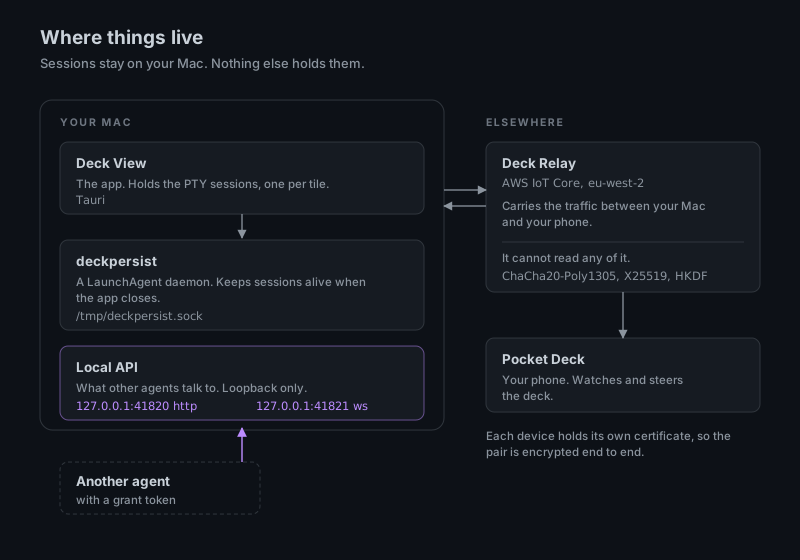
Where it is
http://127.0.0.1:41820, with a bearer token. It is local only; nothing listens on the network. GET /how returns a plain-text guide written by the running app, so it always describes the version you actually have.
The shape of it
Start with /sheets and /slots/free, which see the whole deck. POST /slots/claim puts a project in a slot and starts or resumes an agent. /sessions/{id} reports state (working, idle, attention, exited) and awaiting_trust, which is enough to run a launch competently without reading any conversation.
Every slot carries two numbers: index, which is zero-based and is what URLs take, and tile, which is the number printed on the tile. When you tell a person where something is, say tile.
Every session also reports agent_live: an agent process is running under that window's shell. A bare shell and an idle agent look identical on screen; this is how you tell them apart. After a reboot, GET /sessions/previously-live lists the windows that had an agent and have none now, and POST /sessions/resume-previously-live brings them back as-is, on every sheet, without touching anything that was only loaded.
The deck CLI
A small command-line tool wraps the same API: deck status, deck tiles, deck tile 3 send "…". It finds the token itself.